
-
Home
- Better Admin for SMF 2.1
- Better Portal for SMF 2.1
- Theme Lab for SMF 2.1
- Better Gallery for SMF 2.1
- Better Chat for SMF 2.1
- Better Downloads for SMF 2.1
- Reactions & Likes for SNF 2.1
- Better Links for SMF 2.1
- Better Ads for SMF 2.1
- Better Contact for SMF 2.1
- Better Storage for SMF 2.1
- Better Tags for SMF 2.1
- Better Dark Mode for SMF 2.1
- Forum
- Search
- Gallery
-
 Downloads
- Welcome to Better SMF.
Recent posts
#11
Theme Lab / How to use Theme Lab
Last post by admin - Oct 10, 2026, 12:34 PMHow to Create a Custom SMF 2.1 Theme Without Editing CSS by Hand
Creating a custom SMF theme has traditionally meant spending a lot of time inside stylesheets and template files.
That works, but it also means hunting through CSS, refreshing constantly, fixing one thing only to discover another page now looks wrong, and trying to remember which rule controls which part of the forum.
Theme Lab was built to make that process easier.
Instead of starting with raw CSS, you can build and refine your theme through a dedicated workspace designed specifically for SMF 2.1.
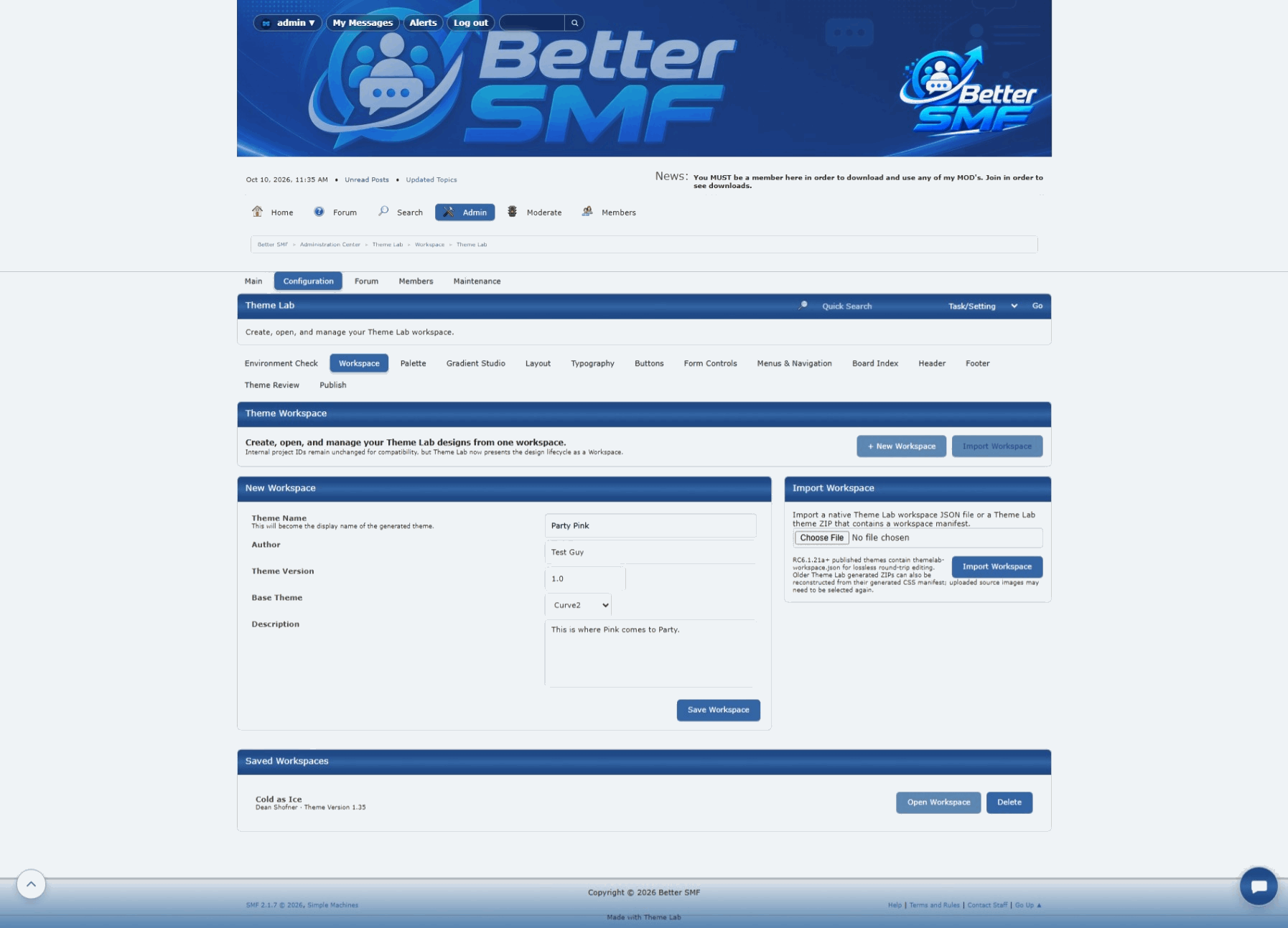
1. Create a Theme Lab workspace
Open Theme Lab from the SMF Admin area and create a new workspace.
A workspace gives you a separate place to develop a theme without immediately affecting the design your visitors are already using.
This is especially useful when you want to:
2. Start with the overall layout
Before worrying about small details, establish the basic structure of the theme.
Theme Lab lets you work with things such as:
Getting the overall proportions right first gives you a much stronger foundation for everything that follows.
3. Choose the visual style
Once the layout is where you want it, begin shaping the personality of the theme.
Depending on the part of the interface you are working on, Theme Lab can help control things like:
The advantage is that you can work with visible theme settings instead of trying to remember which CSS selector controls each piece of SMF.
4. Refine the board index
The board index is one of the first pages visitors see, so it is a good place to begin refining the smaller details.
Check things such as:
Small spacing changes can make a surprisingly large difference in how polished the final theme feels.
5. Check the topic view
A theme is not finished just because the homepage looks good.
Open a topic and inspect the full message layout.
Pay attention to:
This is where you often discover inconsistencies that are easy to miss when only looking at the board index.
6. Test posting and editing screens
Create a test topic or reply and make sure the composer fits the rest of the design.
Look at:
Posting screens are used constantly, so they should feel like part of the same theme rather than an unfinished secondary page.
7. Check menus and dropdowns
Navigation menus are another area where small details matter.
Test the main menu, admin menus, profile menus, and any other dropdowns that appear throughout SMF.
Make sure:
These details are easy to overlook but immediately affect how finished a theme feels.
8. Test the theme on mobile
Do not wait until the end to check a phone.
Responsive behavior should be part of the design process from the beginning.
On smaller screens, inspect:
A layout that looks excellent on desktop can still need small adjustments to feel right on mobile.
9. Refine the details
Once the major layout and color choices are complete, this is where the theme really starts to come together.
Look for the little things:
These may seem minor individually, but together they determine whether a theme feels finished.
10. Publish only when the theme feels ready
Theme Lab is designed around iteration.
You can keep refining a workspace until the design is where you want it, then publish the finished theme for use on your forum.
That lets you experiment without turning your live site into the testing ground.
Why use Theme Lab instead of editing everything manually?
There is nothing wrong with editing CSS by hand.
For experienced theme developers, direct CSS access will always remain useful.
Theme Lab is about making the common parts of theme creation faster and easier while still giving you a structured workflow for testing and refinement.
Instead of spending all your time finding the right rule, you can spend more time deciding how you actually want the forum to look.
Keep testing the entire forum
The most important part of building a good SMF theme is remembering that the forum is more than one screen.
Test:
A theme should feel consistent everywhere.
That is the standard Theme Lab is designed to help you reach.
Creating a custom SMF theme has traditionally meant spending a lot of time inside stylesheets and template files.
That works, but it also means hunting through CSS, refreshing constantly, fixing one thing only to discover another page now looks wrong, and trying to remember which rule controls which part of the forum.
Theme Lab was built to make that process easier.
Instead of starting with raw CSS, you can build and refine your theme through a dedicated workspace designed specifically for SMF 2.1.
1. Create a Theme Lab workspace
Open Theme Lab from the SMF Admin area and create a new workspace.
A workspace gives you a separate place to develop a theme without immediately affecting the design your visitors are already using.
This is especially useful when you want to:
- Build a completely new theme
- Experiment with a different style
- Create light or dark variations
- Test changes before publishing
- Maintain multiple theme projects
2. Start with the overall layout
Before worrying about small details, establish the basic structure of the theme.
Theme Lab lets you work with things such as:
- Overall forum width
- Page and content backgrounds
- Header layout
- Forum body spacing
- Panel sizing and alignment
Getting the overall proportions right first gives you a much stronger foundation for everything that follows.
3. Choose the visual style
Once the layout is where you want it, begin shaping the personality of the theme.
Depending on the part of the interface you are working on, Theme Lab can help control things like:
- Colors and gradients
- Borders
- Border radius
- Shadows
- Buttons
- Text and link treatment
- Navigation elements
The advantage is that you can work with visible theme settings instead of trying to remember which CSS selector controls each piece of SMF.
4. Refine the board index
The board index is one of the first pages visitors see, so it is a good place to begin refining the smaller details.
Check things such as:
- Board spacing
- Section headers
- Board icons
- Topic and post statistics
- Latest-post areas
- Outer padding and alignment
Small spacing changes can make a surprisingly large difference in how polished the final theme feels.
5. Check the topic view
A theme is not finished just because the homepage looks good.
Open a topic and inspect the full message layout.
Pay attention to:
- Message headers
- Post body spacing
- User information
- Quick buttons
- Signatures
- Attachments
- Quick Reply
This is where you often discover inconsistencies that are easy to miss when only looking at the board index.
6. Test posting and editing screens
Create a test topic or reply and make sure the composer fits the rest of the design.
Look at:
- Editor spacing
- Input fields
- BBC controls
- Buttons
- Preview areas
- Additional options
Posting screens are used constantly, so they should feel like part of the same theme rather than an unfinished secondary page.
7. Check menus and dropdowns
Navigation menus are another area where small details matter.
Test the main menu, admin menus, profile menus, and any other dropdowns that appear throughout SMF.
Make sure:
- Dropdowns are wide enough for their text
- Icons line up correctly
- Hover states are easy to read
- Menus appear above the content beneath them
- Nothing gets clipped or hidden
These details are easy to overlook but immediately affect how finished a theme feels.
8. Test the theme on mobile
Do not wait until the end to check a phone.
Responsive behavior should be part of the design process from the beginning.
On smaller screens, inspect:
- Main navigation
- Board listings
- Topic controls
- Dropdown menus
- Posting forms
- Buttons that wrap onto multiple lines
A layout that looks excellent on desktop can still need small adjustments to feel right on mobile.
9. Refine the details
Once the major layout and color choices are complete, this is where the theme really starts to come together.
Look for the little things:
- Buttons that sit a pixel too high
- Inconsistent corner radius
- Panels that do not quite line up
- Extra gaps between connected sections
- Icons that look too large or too small
- Hover states that do not match the rest of the theme
These may seem minor individually, but together they determine whether a theme feels finished.
10. Publish only when the theme feels ready
Theme Lab is designed around iteration.
You can keep refining a workspace until the design is where you want it, then publish the finished theme for use on your forum.
That lets you experiment without turning your live site into the testing ground.
Why use Theme Lab instead of editing everything manually?
There is nothing wrong with editing CSS by hand.
For experienced theme developers, direct CSS access will always remain useful.
Theme Lab is about making the common parts of theme creation faster and easier while still giving you a structured workflow for testing and refinement.
Instead of spending all your time finding the right rule, you can spend more time deciding how you actually want the forum to look.
Keep testing the entire forum
The most important part of building a good SMF theme is remembering that the forum is more than one screen.
Test:
- Board index
- Topic listings
- Topic view
- Posting
- Profiles
- Administration
- Moderation
- Menus
- Desktop
- Mobile
A theme should feel consistent everywhere.
That is the standard Theme Lab is designed to help you reach.
Build it. Refine it. Make SMF yours.
#12
Better Portal / How to build a portal for SMF ...
Last post by admin - Oct 10, 2026, 07:20 AMHow to Build a Portal Page in SMF 2.1 with Better Portal
Better Portal was designed to make building custom pages for SMF simple, flexible, and easy to manage.
You do not need to build a separate website, edit template files, or fight with complicated page-builder software.
With Better Portal, you can create pages using rows, columns, and reusable blocks directly from the SMF Admin area.
This guide walks through the basic process.
1. Open the Better Portal Page Builder
From the SMF Admin Center, open Better Portal and go to the Page Builder.
This is where you create and manage Portal pages.
You can either work with an existing page or create a new one from the Pages area.
2. Create or select a page
Each Portal page has its own settings and layout.
Typical page settings include:
This means you can build completely separate pages for different purposes.
For example:
3. Add a row
Portal pages are built using rows.
Each row can use its own column layout.
Depending on the page you are building, you might choose:
This lets you build the page around the content instead of forcing every page into the same layout.
4. Add blocks to the columns
Once a row exists, choose a block from the dropdown beneath the column where you want it to appear.
Click Add Block, and Better Portal will place that block into the selected column.
Available blocks can include things such as:
If other Better SMF MODs are installed, additional blocks can become available automatically.
Examples can include:
5. Configure each block
Every block has its own settings.
Depending on the block, you may be able to change things like:
This keeps the page flexible without requiring custom code.
6. Reorder blocks and rows
As the page grows, you can move blocks and rows until the layout feels right.
Better Portal is designed so that page building stays visual and predictable.
You can build the page a little at a time, save it, preview it, and continue refining the layout without rebuilding everything from scratch.
7. Use Custom Text for introductions and landing-page content
The Custom Text block is especially useful for:
Because Custom Text supports SMF BBC, you can use familiar formatting such as:
8. Add screenshots with Better Gallery
If Better Gallery is installed, a useful option for landing pages is the Selected Gallery Album block.
This lets you choose one Gallery album and display its images directly on the Portal page.
That works especially well for:
The images remain managed by Better Gallery, so you can update the album later without rebuilding the Portal page.
9. Save and preview the page
Once the layout and blocks are in place, save the page and use the preview option to see how it looks.
Check the page on both desktop and mobile.
Better Portal layouts are designed to stack cleanly on smaller screens, so multi-column desktop layouts remain usable on phones and tablets.
10. Decide whether the page should appear in navigation
Not every Portal page needs a menu button.
You can choose whether a page appears in Better Portal navigation.
This is useful for things like:
That gives you control over how visitors discover each page.
A simple example
A product landing page might use a two-column row:
Underneath that, you could add a Download link, support information, or related MODs.
That is the same approach used on Better SMF for MOD landing pages.
The goal is to keep it simple
Better Portal is not trying to replace SMF with a complicated content-management system.
It is meant to give administrators an easier way to build useful pages while keeping the site connected to the forum.
You choose the page.
You choose the layout.
You choose the blocks.
Better Portal handles the structure.
Better Portal was designed to make building custom pages for SMF simple, flexible, and easy to manage.
You do not need to build a separate website, edit template files, or fight with complicated page-builder software.
With Better Portal, you can create pages using rows, columns, and reusable blocks directly from the SMF Admin area.
This guide walks through the basic process.
1. Open the Better Portal Page Builder
From the SMF Admin Center, open Better Portal and go to the Page Builder.
This is where you create and manage Portal pages.
You can either work with an existing page or create a new one from the Pages area.
Screenshot: Better Portal Page Builder
2. Create or select a page
Each Portal page has its own settings and layout.
Typical page settings include:
- Page title
- Slug
- Whether the page appears in Portal navigation
- Menu label
- Menu order
- Who is allowed to view the page
- Whether the page is enabled
This means you can build completely separate pages for different purposes.
For example:
- Home page
- Downloads page
- Gallery page
- Support page
- MOD landing page
- Staff-only page
3. Add a row
Portal pages are built using rows.
Each row can use its own column layout.
Depending on the page you are building, you might choose:
- One full-width column
- Two equal columns
- A narrow sidebar with a wider main column
- A wider main column with a narrow sidebar
- Three-column layouts
This lets you build the page around the content instead of forcing every page into the same layout.
Screenshot: Adding a row and selecting a layout
4. Add blocks to the columns
Once a row exists, choose a block from the dropdown beneath the column where you want it to appear.
Click Add Block, and Better Portal will place that block into the selected column.
Available blocks can include things such as:
- Custom Text
- Latest Forum Posts
- Latest Topics
- Who's Online
- Forum Statistics
- Forum content
If other Better SMF MODs are installed, additional blocks can become available automatically.
Examples can include:
- Better Gallery blocks
- Better Downloads blocks
- Better Chat blocks
- Better Reactions & Likes blocks
- Better Ads placements
5. Configure each block
Every block has its own settings.
Depending on the block, you may be able to change things like:
- Block title
- Column placement
- Whether the block is enabled
- Whether the block title is displayed
- Number of items to show
- Display style
- Selected album, board, category, or other content source
This keeps the page flexible without requiring custom code.
6. Reorder blocks and rows
As the page grows, you can move blocks and rows until the layout feels right.
Better Portal is designed so that page building stays visual and predictable.
You can build the page a little at a time, save it, preview it, and continue refining the layout without rebuilding everything from scratch.
7. Use Custom Text for introductions and landing-page content
The Custom Text block is especially useful for:
- Page introductions
- Product descriptions
- Instructions
- Marketing copy
- Download links
- Support information
Because Custom Text supports SMF BBC, you can use familiar formatting such as:
- Bold text
- Italic text
- Lists
- Links
- Images
- Floated images
- Centered headings and callouts
8. Add screenshots with Better Gallery
If Better Gallery is installed, a useful option for landing pages is the Selected Gallery Album block.
This lets you choose one Gallery album and display its images directly on the Portal page.
That works especially well for:
- MOD screenshots
- Product demonstrations
- Before-and-after examples
- Feature galleries
The images remain managed by Better Gallery, so you can update the album later without rebuilding the Portal page.
9. Save and preview the page
Once the layout and blocks are in place, save the page and use the preview option to see how it looks.
Check the page on both desktop and mobile.
Better Portal layouts are designed to stack cleanly on smaller screens, so multi-column desktop layouts remain usable on phones and tablets.
10. Decide whether the page should appear in navigation
Not every Portal page needs a menu button.
You can choose whether a page appears in Better Portal navigation.
This is useful for things like:
- Landing pages reached through links
- Temporary campaign pages
- Staff-only pages
- Product pages linked from the Downloads area
That gives you control over how visitors discover each page.
A simple example
A product landing page might use a two-column row:
- Left column: Custom Text with the product description and features
- Right column: Selected Gallery Album showing screenshots
Underneath that, you could add a Download link, support information, or related MODs.
That is the same approach used on Better SMF for MOD landing pages.
The goal is to keep it simple
Better Portal is not trying to replace SMF with a complicated content-management system.
It is meant to give administrators an easier way to build useful pages while keeping the site connected to the forum.
You choose the page.
You choose the layout.
You choose the blocks.
Better Portal handles the structure.
Build the page you want. Keep the forum you love.
#13
Better Admin / How to Bulk Delete Topics in S...
Last post by admin - Oct 09, 2026, 12:53 PMHow to Bulk Delete Topics in SMF 2.1
If you run an active SMF forum long enough, eventually you are going to deal with spam, duplicate topics, test posts, or old content that needs to be cleaned up.
The problem is that stock SMF can make something as simple as removing several topics feel more tedious than it should.
If someone posts ten spam topics while you are away, opening each one individually, finding the removal option, confirming it, going back to the board, and then repeating the process over and over gets old very quickly.
That is exactly the kind of workflow Better Admin was created to improve.
The stock SMF problem
SMF already gives administrators and moderators powerful topic-management tools, but many of those actions are designed around working with one topic at a time.
For occasional moderation that is fine.
For cleanup work, it can become unnecessarily slow.
Imagine needing to remove:
Doing that one topic at a time means repeating the same actions again and again.
Better Admin adds bulk topic controls directly to the board listing
With Better Admin installed, administrators and moderators can manage multiple topics from the board topic list itself.
Each topic gets a selection checkbox and the topic list includes a Select All option.
Once the topics are selected, the Bulk Topic Actions control can be used without opening each topic individually.
Current bulk actions include:
How to bulk delete topics
The process is simple.
1. Open the board containing the topics you want to remove.
Better Admin adds a checkbox beside each topic in the board listing.
2. Select the topics you want to delete.
You can select individual topics or use the Select All checkbox if you want to manage every topic currently shown on the page.
3. Choose Delete from Bulk Topic Actions.
The bulk action control appears directly beneath the topic list, so there is no need to open the selected topics individually.
4. Confirm the deletion.
Better Admin keeps destructive actions behind a confirmation step so you still have a chance to stop before removing multiple topics.
Once confirmed, SMF handles the deletion normally underneath Better Admin's improved interface.
More than just bulk delete
Bulk topic management is only one part of Better Admin.
The same topic-list interface can also be used to:
Topics placed Under Review remain visible to authorized staff while disappearing for regular members.
This can be especially useful when content needs to be checked before making a permanent decision.
Designed to work with SMF, not around it
Better Admin does not replace SMF's moderation system.
Wherever possible, it uses SMF's existing permissions, security checks, topic handling, and moderation logic underneath the improved workflow.
The goal is not to reinvent SMF.
The goal is to make the tools already available to administrators and moderators faster and easier to use.
Why this matters
Bulk topic management is one of those features that may sound small until the first time you actually need it.
Cleaning ten spam topics one at a time is annoying.
Selecting ten topics and deleting them in one action takes seconds.
That is what Better Admin is built around:
If you run an active SMF forum long enough, eventually you are going to deal with spam, duplicate topics, test posts, or old content that needs to be cleaned up.
The problem is that stock SMF can make something as simple as removing several topics feel more tedious than it should.
If someone posts ten spam topics while you are away, opening each one individually, finding the removal option, confirming it, going back to the board, and then repeating the process over and over gets old very quickly.
That is exactly the kind of workflow Better Admin was created to improve.
The stock SMF problem
SMF already gives administrators and moderators powerful topic-management tools, but many of those actions are designed around working with one topic at a time.
For occasional moderation that is fine.
For cleanup work, it can become unnecessarily slow.
Imagine needing to remove:
- 10 spam topics
- several duplicate topics
- old test topics
- multiple topics that need to be moved to another board
Doing that one topic at a time means repeating the same actions again and again.
Better Admin adds bulk topic controls directly to the board listing
With Better Admin installed, administrators and moderators can manage multiple topics from the board topic list itself.
Each topic gets a selection checkbox and the topic list includes a Select All option.
Once the topics are selected, the Bulk Topic Actions control can be used without opening each topic individually.
Current bulk actions include:
- Delete selected topics
- Move selected topics
- Place selected topics Under Review
- Restore selected topics from review
How to bulk delete topics
The process is simple.
1. Open the board containing the topics you want to remove.
Better Admin adds a checkbox beside each topic in the board listing.
2. Select the topics you want to delete.
You can select individual topics or use the Select All checkbox if you want to manage every topic currently shown on the page.
3. Choose Delete from Bulk Topic Actions.
The bulk action control appears directly beneath the topic list, so there is no need to open the selected topics individually.
4. Confirm the deletion.
Better Admin keeps destructive actions behind a confirmation step so you still have a chance to stop before removing multiple topics.
Once confirmed, SMF handles the deletion normally underneath Better Admin's improved interface.
More than just bulk delete
Bulk topic management is only one part of Better Admin.
The same topic-list interface can also be used to:
- Move several topics at once
- Temporarily hide selected topics by placing them Under Review
- Restore reviewed topics when they are ready to return
Topics placed Under Review remain visible to authorized staff while disappearing for regular members.
This can be especially useful when content needs to be checked before making a permanent decision.
Designed to work with SMF, not around it
Better Admin does not replace SMF's moderation system.
Wherever possible, it uses SMF's existing permissions, security checks, topic handling, and moderation logic underneath the improved workflow.
The goal is not to reinvent SMF.
The goal is to make the tools already available to administrators and moderators faster and easier to use.
Why this matters
Bulk topic management is one of those features that may sound small until the first time you actually need it.
Cleaning ten spam topics one at a time is annoying.
Selecting ten topics and deleting them in one action takes seconds.
That is what Better Admin is built around:
Less hunting. Fewer clicks. Better control.
#14
Better Admin / Better Admin - About
Last post by admin - Oct 09, 2026, 10:58 AMBetter Admin was created to solve a simple problem: administering and moderating an SMF forum should not take more clicks than necessary.
SMF already gives administrators and moderators a lot of power, but some everyday tasks are buried behind menus, split across multiple pages, or require repeating the same action over and over again.
Better Admin keeps the parts of SMF that already work and improves the workflows around them.
Built for real administration
Better Admin is focused on making common moderation and administration tasks faster, clearer, and easier to manage directly where the content lives.
Instead of forcing staff to open topics one at a time, hunt through menus, or repeat the same action over and over, Better Admin brings the tools forward and adds safe bulk-management options where they make sense.
Bulk Topic Management
On board topic listings, administrators and moderators can select multiple topics at once and perform common actions without opening each topic individually.
Current bulk topic tools include:
Topics placed Under Review are hidden from regular members while remaining visible to staff for inspection.
Cleaner Topic Controls
Better Admin removes the need to rely on SMF's hidden More... menu for common actions.
Important controls are brought directly into the topic and reply interface, including:
The goal is simple: frequently used actions should be visible when you need them.
Bulk Reply Management
Replies inside a topic can also be managed in bulk.
The topic starter is always protected and excluded from bulk reply actions.
Staff can select individual replies or use Select All Replies and then:
Individual replies can also be placed Under Review or restored one at a time.
Replies Under Review disappear completely for regular members while remaining visible to authorized staff with a clear status badge.
A Better Package Manager
Better Admin also improves one of the most frequently used areas of the SMF Admin Center: the Package Manager.
Uploaded packages now stay in a stable, predictable order instead of jumping around as packages are installed, upgraded, or deleted.
The Package Manager improvements include:
Designed to work with SMF, not against it
Better Admin does not try to replace SMF's existing moderation and permission systems.
Wherever possible, it uses SMF's native actions, permissions, security checks, and message/topic handling underneath the improved interface.
That means the experience gets better without throwing away the stability and behavior SMF already provides.
Built slowly and tested heavily
Better Admin is being developed in stages.
Each new workflow is added carefully, tested heavily, refined, and only then used as the foundation for the next stage.
The goal is not to add features just for the sake of having more buttons.
The goal is to make administering an SMF forum genuinely better.
SMF already gives administrators and moderators a lot of power, but some everyday tasks are buried behind menus, split across multiple pages, or require repeating the same action over and over again.
Better Admin keeps the parts of SMF that already work and improves the workflows around them.
Built for real administration
Better Admin is focused on making common moderation and administration tasks faster, clearer, and easier to manage directly where the content lives.
Instead of forcing staff to open topics one at a time, hunt through menus, or repeat the same action over and over, Better Admin brings the tools forward and adds safe bulk-management options where they make sense.
Bulk Topic Management
On board topic listings, administrators and moderators can select multiple topics at once and perform common actions without opening each topic individually.
Current bulk topic tools include:
- Delete selected topics
- Move selected topics
- Place selected topics Under Review
- Restore topics from review
Topics placed Under Review are hidden from regular members while remaining visible to staff for inspection.
Cleaner Topic Controls
Better Admin removes the need to rely on SMF's hidden More... menu for common actions.
Important controls are brought directly into the topic and reply interface, including:
- Edit
- Delete
- Report
- Split Topic
- Other moderation actions when permissions allow
The goal is simple: frequently used actions should be visible when you need them.
Bulk Reply Management
Replies inside a topic can also be managed in bulk.
The topic starter is always protected and excluded from bulk reply actions.
Staff can select individual replies or use Select All Replies and then:
- Delete selected replies
- Place selected replies Under Review
- Restore selected replies
Individual replies can also be placed Under Review or restored one at a time.
Replies Under Review disappear completely for regular members while remaining visible to authorized staff with a clear status badge.
A Better Package Manager
Better Admin also improves one of the most frequently used areas of the SMF Admin Center: the Package Manager.
Uploaded packages now stay in a stable, predictable order instead of jumping around as packages are installed, upgraded, or deleted.
The Package Manager improvements include:
- Stable package ordering based on when packages were added
- New packages appear at the bottom of the list
- Existing packages remain in place until deleted
- Successful installs and upgrades return you directly to the package list
- The package you just worked with is highlighted
- Clear success and failure alerts
- Success messages fade automatically
- Error messages remain until dismissed
Designed to work with SMF, not against it
Better Admin does not try to replace SMF's existing moderation and permission systems.
Wherever possible, it uses SMF's native actions, permissions, security checks, and message/topic handling underneath the improved interface.
That means the experience gets better without throwing away the stability and behavior SMF already provides.
Built slowly and tested heavily
Better Admin is being developed in stages.
Each new workflow is added carefully, tested heavily, refined, and only then used as the foundation for the next stage.
The goal is not to add features just for the sake of having more buttons.
The goal is to make administering an SMF forum genuinely better.
Less hunting. Fewer clicks. Better control.
Better Admin — because running your forum should be easier.
#15
Theme Share / Re: Cold as Ice
Last post by colder - Oct 02, 2026, 10:35 AMHey thanks for this one man, I live the soft blue colors and I will only have to tweek a few things!
@admin I will be checking back for any updates on this theme!!
@admin I will be checking back for any updates on this theme!!
#16
Better Ads / Better Ads - About
Last post by admin - Oct 01, 2026, 07:58 PMBetter Ads is a complete advertising management system for SMF 2.1.x designed to handle the entire advertising process from first inquiry to campaign reporting.
It started as a simple way to place advertisements around an SMF forum and grew into a full advertising workflow that remains easy for both administrators and advertisers to use.
Admins can create reusable advertising units and place them throughout the forum, Better Portal, and Better Gallery. Ads can use images or raw HTML/code, target specific audiences, boards, or member groups, run on schedules, rotate through placements, and repeat between topics, replies, or gallery items.
Better Ads also includes a complete advertiser-facing system.
Site owners can create advertising tiers that define the placement, price, campaign duration, and payment information. Visitors can choose a package, submit an advertising request, upload their creative, and receive a private order link.
From there, Better Ads guides both sides through the entire process:
Request → Approval → Payment → Campaign → Statistics → Renewal
Advertisers automatically receive email updates as their campaign moves through each stage, so they always know what is happening and what to expect next.
Once the campaign is created, the same private order link becomes a read-only performance dashboard showing impressions, clicks, CTR, campaign status, time remaining, and renewal options.
Administrators get a clean workflow inside the Better Ads admin area, including dedicated sections for campaigns, advertising tiers, requests and orders, statistics, and settings.
Main features include
- Image advertisements
- Raw HTML/code advertisements
- Reusable advertising units
- Global header and footer placements
- Board and topic placements
- Repeat-between-topic and repeat-between-reply ads
- Better Portal integration
- Better Gallery integration
- Full-width sponsored gallery rows
- Sponsored gallery cards
- Audience targeting
- Board targeting
- Member-group targeting
- Scheduled campaigns
- Campaign expiration
- Ad rotation
- Click tracking
- Impression tracking
- CTR reporting
- Today, 7-day, 30-day, and lifetime statistics
- Advertising tiers
- Public Advertise With Us page
- Advertiser request workflow
- Creative uploads
- Hosted payment-link support
- Private order pages
- Automated advertiser email notifications
- Campaign performance dashboards
- Campaign lifecycle tracking
- Renewals
- Admin pending-request notifications
- Native SMF admin badge integration
- Archive and status filtering
- Mobile-friendly advertiser pages
Better Ads does not collect credit-card information itself. Payment is handled through hosted payment providers, while Better Ads manages the order, campaign, communication, and reporting workflow.
The goal is simple: make advertising on an SMF site feel professional for the person buying the ad and painless for the administrator managing it.
Sell the placement. Manage the campaign. Keep the advertiser informed. Show them the results.
It started as a simple way to place advertisements around an SMF forum and grew into a full advertising workflow that remains easy for both administrators and advertisers to use.
Admins can create reusable advertising units and place them throughout the forum, Better Portal, and Better Gallery. Ads can use images or raw HTML/code, target specific audiences, boards, or member groups, run on schedules, rotate through placements, and repeat between topics, replies, or gallery items.
Better Ads also includes a complete advertiser-facing system.
Site owners can create advertising tiers that define the placement, price, campaign duration, and payment information. Visitors can choose a package, submit an advertising request, upload their creative, and receive a private order link.
From there, Better Ads guides both sides through the entire process:
Request → Approval → Payment → Campaign → Statistics → Renewal
Advertisers automatically receive email updates as their campaign moves through each stage, so they always know what is happening and what to expect next.
Once the campaign is created, the same private order link becomes a read-only performance dashboard showing impressions, clicks, CTR, campaign status, time remaining, and renewal options.
Administrators get a clean workflow inside the Better Ads admin area, including dedicated sections for campaigns, advertising tiers, requests and orders, statistics, and settings.
Main features include
- Image advertisements
- Raw HTML/code advertisements
- Reusable advertising units
- Global header and footer placements
- Board and topic placements
- Repeat-between-topic and repeat-between-reply ads
- Better Portal integration
- Better Gallery integration
- Full-width sponsored gallery rows
- Sponsored gallery cards
- Audience targeting
- Board targeting
- Member-group targeting
- Scheduled campaigns
- Campaign expiration
- Ad rotation
- Click tracking
- Impression tracking
- CTR reporting
- Today, 7-day, 30-day, and lifetime statistics
- Advertising tiers
- Public Advertise With Us page
- Advertiser request workflow
- Creative uploads
- Hosted payment-link support
- Private order pages
- Automated advertiser email notifications
- Campaign performance dashboards
- Campaign lifecycle tracking
- Renewals
- Admin pending-request notifications
- Native SMF admin badge integration
- Archive and status filtering
- Mobile-friendly advertiser pages
Better Ads does not collect credit-card information itself. Payment is handled through hosted payment providers, while Better Ads manages the order, campaign, communication, and reporting workflow.
The goal is simple: make advertising on an SMF site feel professional for the person buying the ad and painless for the administrator managing it.
Sell the placement. Manage the campaign. Keep the advertiser informed. Show them the results.
#17
Better Portal / Better Portal - About
Last post by admin - Oct 01, 2026, 07:56 PMBetter Portal is a flexible portal and page-builder system for SMF 2.1.x designed to make building a custom front page simple instead of frustrating.
A lot of portal systems are powerful, but they can also be confusing to configure. Better Portal was built around the opposite idea: give forum owners useful building blocks, clear controls, and enough flexibility to create a professional layout without having to fight the interface.
You can create multiple portal pages, choose which one acts as your home page, control column layouts and widths, and arrange content using draggable rows and blocks. Preset blocks make it easy to add useful forum content such as latest posts, who's online, forum statistics, polls, downloads, gallery content, chat, reactions, and more.
Better Portal also integrates directly with other Better SMF mods. If Better Gallery, Better Chat, Better Downloads, Better Reactions & Likes, or other supported Better mods are installed, Portal can expose dedicated blocks for them automatically.
One of the biggest features is Forum Mode, which allows the forum itself to live inside a portal page. Boards, topics, posting, replies, downloads, gallery content, and other interactive features can all remain inside the portal experience instead of constantly sending users to separate sections of the site.
Better Portal was designed to work well on desktop and mobile, with responsive layouts that can stack naturally on smaller screens.
Main features include
- Multiple portal pages
- Selectable home page
- One, two, and three-column layouts
- Adjustable column widths
- Drag-and-drop rows and blocks
- Custom content blocks
- Preset SMF content blocks
- Latest forum posts
- Who's online
- Forum statistics
- Polls
- Full forum-in-a-block support
- Better Gallery integration
- Better Chat integration
- Better Downloads integration
- Better Reactions & Likes integration
- Mobile-friendly layouts
- Portal-based forum navigation
- Extensible block registry for future mods
Better Portal is built to give SMF site owners a powerful portal without turning site management into a project of its own.
Simple to build. Easy to understand. Flexible enough to grow with your forum.
A lot of portal systems are powerful, but they can also be confusing to configure. Better Portal was built around the opposite idea: give forum owners useful building blocks, clear controls, and enough flexibility to create a professional layout without having to fight the interface.
You can create multiple portal pages, choose which one acts as your home page, control column layouts and widths, and arrange content using draggable rows and blocks. Preset blocks make it easy to add useful forum content such as latest posts, who's online, forum statistics, polls, downloads, gallery content, chat, reactions, and more.
Better Portal also integrates directly with other Better SMF mods. If Better Gallery, Better Chat, Better Downloads, Better Reactions & Likes, or other supported Better mods are installed, Portal can expose dedicated blocks for them automatically.
One of the biggest features is Forum Mode, which allows the forum itself to live inside a portal page. Boards, topics, posting, replies, downloads, gallery content, and other interactive features can all remain inside the portal experience instead of constantly sending users to separate sections of the site.
Better Portal was designed to work well on desktop and mobile, with responsive layouts that can stack naturally on smaller screens.
Main features include
- Multiple portal pages
- Selectable home page
- One, two, and three-column layouts
- Adjustable column widths
- Drag-and-drop rows and blocks
- Custom content blocks
- Preset SMF content blocks
- Latest forum posts
- Who's online
- Forum statistics
- Polls
- Full forum-in-a-block support
- Better Gallery integration
- Better Chat integration
- Better Downloads integration
- Better Reactions & Likes integration
- Mobile-friendly layouts
- Portal-based forum navigation
- Extensible block registry for future mods
Better Portal is built to give SMF site owners a powerful portal without turning site management into a project of its own.
Simple to build. Easy to understand. Flexible enough to grow with your forum.
#18
Better HTTP / Better HTTP - About
Last post by admin - Sep 16, 2026, 11:27 AMBetter HTTP gives SMF a more reliable, modern outbound HTTP transport layer by preferring cURL, intelligently recovering across IPv4 and IPv6, and falling back to SMF's native socket path only when necessary.
Built for SMF 2.1.x, Better HTTP improves the reliability of server-side web requests used by SMF itself and by compatible MODs, while adding detailed diagnostics and privacy-safe observability so administrators can see exactly how outbound requests are being handled.
Features
Better HTTP is installed through the normal SMF Package Manager.
RC1 supports direct upgrades from the current development builds, including dev7b.
The MOD applies a small, controlled modification to SMF's outbound HTTP path while keeping the main Better HTTP logic in its own source file.
Uninstall Behavior
Better HTTP follows the Better SMF uninstall standard.
Remove data unchecked:
Better HTTP files are removed.
SMF source modifications are reversed.
Integration hooks are removed.
Observability data and request history are preserved for a future reinstall.
Remove data checked:
Everything above is removed.
Better HTTP counters, history, and stored observability data are also deleted.
The release candidate has been validated to restore the modified SMF source file back to the stock version during uninstall.
Compatibility
SMF 2.1.x
PHP with cURL recommended
fsockopen() retained as native fallback where available
IPv6 support automatically detected
Why Better HTTP?
SMF already has a central outbound request system, but its stock behavior prefers raw socket connections before cURL.
Better HTTP reverses that priority and adds modern recovery, diagnostics, and visibility without requiring every MOD to implement its own HTTP client.
That means SMF and compatible Better SMF MODs can benefit from a more robust outbound networking layer automatically.
Better HTTP — make SMF's outbound connections more reliable, observable, and resilient.
Version: 1.0.0 RC1
Platform: SMF 2.1.x
Category: MODS → Technical
Built for SMF 2.1.x, Better HTTP improves the reliability of server-side web requests used by SMF itself and by compatible MODs, while adding detailed diagnostics and privacy-safe observability so administrators can see exactly how outbound requests are being handled.
Features
- cURL-first outbound HTTP/HTTPS
- Uses cURL whenever available.
- Preserves SMF's normal fetch_web_data() behavior for existing callers.
- Intelligent IPv4 / IPv6 recovery
- Starts with normal automatic address-family selection.
- If a safe GET request encounters a genuine connection-class failure, Better HTTP can retry using the alternate IP family.
- IPv4 and IPv6 connectivity can be tested independently from the admin panel.
- Native SMF socket fallback
- If cURL cannot complete the request, Better HTTP can fall back to SMF's existing fsockopen() transport.
- Fallback behavior remains compatible with stock SMF.
- Safer POST handling
- POST requests are not automatically replayed across network families after uncertain failures.
- If the remote server returns a real HTTP response such as 403, 404, or 500, Better HTTP records that response instead of incorrectly treating it as a transport failure and retrying the POST.
- TLS verification
- HTTPS requests use certificate and hostname verification.
- TLS failures are not silently downgraded into less-strict retry paths.
- Live connection diagnostics
- Run a real IANA connection test from the admin panel.
- Displays:
- transport used
- HTTP status
- IPv4 or IPv6
- remote server address
- DNS lookup time
- connection time
- total request time
- TLS status
- fallback status
- cURL errors
- IPv4 / IPv6 reachability matrix
- Independently tests:
- automatic resolution
- forced IPv4
- forced IPv6
- Controlled recovery testing
- Safely simulates a failed primary cURL attempt to confirm alternate-family recovery works.
- No DNS, firewall, routing, or server configuration changes are made.
- Full fallback simulation
- Safely exercises the complete transport ladder:
- cURL attempt
- alternate-family recovery
- native SMF socket fallback
- Useful for confirming how the server behaves when every cURL path is unavailable.
- Real Request Observability
- Tracks privacy-safe statistics for actual outbound SMF requests.
- Includes:
- total requests
- cURL successes
- IP-family recoveries
- native socket fallbacks
- socket connection failures
- HTTP non-success responses
- terminal Better HTTP failures
- Recent request history
- Stores the 20 most recent real outbound requests with:
- target hostname
- GET / POST
- transport used
- initial and final IP family
- recovery status
- HTTP status
- duration
- fallback status
- result
- Host activity summary
- Shows recent request counts by hostname.
- Includes average and slowest request times, recoveries, and fallbacks.
- Slow request reporting
- Highlights the slowest recent outbound requests for quick troubleshooting.
- At-a-glance health information
- Shows:
- last real request
- last IP-family recovery
- last native socket fallback
- last HTTP non-success response
- last terminal failure
- most active recent host
- slowest recent request
- Privacy-conscious diagnostics
- Does not store:
- full URLs
- query strings
- response bodies
- POST contents
- visitor IP addresses
- member information
- session data
- remote server IP history
Better HTTP is installed through the normal SMF Package Manager.
RC1 supports direct upgrades from the current development builds, including dev7b.
The MOD applies a small, controlled modification to SMF's outbound HTTP path while keeping the main Better HTTP logic in its own source file.
Uninstall Behavior
Better HTTP follows the Better SMF uninstall standard.
Remove data unchecked:
Better HTTP files are removed.
SMF source modifications are reversed.
Integration hooks are removed.
Observability data and request history are preserved for a future reinstall.
Remove data checked:
Everything above is removed.
Better HTTP counters, history, and stored observability data are also deleted.
The release candidate has been validated to restore the modified SMF source file back to the stock version during uninstall.
Compatibility
SMF 2.1.x
PHP with cURL recommended
fsockopen() retained as native fallback where available
IPv6 support automatically detected
Why Better HTTP?
SMF already has a central outbound request system, but its stock behavior prefers raw socket connections before cURL.
Better HTTP reverses that priority and adds modern recovery, diagnostics, and visibility without requiring every MOD to implement its own HTTP client.
That means SMF and compatible Better SMF MODs can benefit from a more robust outbound networking layer automatically.
Better HTTP — make SMF's outbound connections more reliable, observable, and resilient.
Version: 1.0.0 RC1
Platform: SMF 2.1.x
Category: MODS → Technical
#19
Better CAPTCHA / Better CAPTCHA - About
Last post by admin - Sep 14, 2026, 11:26 AMBetter CAPTCHA is a self-hosted anti-bot protection system for SMF 2.1.x designed to improve verification without handing your visitors off to Google, Cloudflare, or another third-party CAPTCHA service.
The goal is simple:
Prove you're human without proving who you are.
Better CAPTCHA keeps verification local to your forum and adds adaptive protection that becomes stronger only when suspicious or repeated failed behavior warrants it.
Better CAPTCHA does not force every legitimate visitor through the hardest possible challenge.
A normal visitor begins with the standard local verification challenge. Repeated failures progressively increase the protection level.
At the highest adaptive tier, Better CAPTCHA can switch to its drag-and-drop puzzle challenge.
The user grabs the loose puzzle piece and places it into the matching opening in the image.
The answer coordinates are kept on the server. The browser receives the rendered puzzle and an opaque challenge identifier rather than the correct answer.
Once the puzzle is active, it replaces the normal letter CAPTCHA for that attempt rather than forcing the user to complete both.
Accessibility Fallback
The puzzle is never the only available verification method.
A Use visual/audio challenge instead button restores SMF's normal locally generated visual/audio CAPTCHA for users who cannot or do not want to use drag-and-drop verification.
Protection Presets
Better CAPTCHA includes four configuration modes:
Balanced — Recommended
Designed for normal forums. Provides adaptive protection without becoming unnecessarily aggressive.
Temporary lockout: 90 seconds
Privacy First
Uses conservative escalation and minimizes retained information while remaining completely self-hosted.
Temporary lockout: 120 seconds
High Security
Escalates quickly after failed attempts and reaches the puzzle challenge sooner.
Temporary lockout: 300 seconds
Custom Settings
Allows the administrator to manually control the adaptive thresholds, visual challenge strength, timing requirements, failure limits, challenge lifetime, and lockout behavior.
Privacy
Better CAPTCHA was designed so stronger anti-bot protection does not require building visitor profiles.
Visitor-specific adaptive state and throttling information remain in the visitor's SMF session.
Optional persistent diagnostics are aggregate counters only.
Better CAPTCHA does not store:
Administrators can view privacy-safe aggregate statistics including:
These counters are intended to show whether protection is actually being exercised without maintaining a visitor activity log.
Environment Diagnostics
The Better CAPTCHA administration page also reports important environment information such as:
Better CAPTCHA 0.1.0 includes the first production version of its local jigsaw challenge.
The puzzle:
The current release uses a locally generated puzzle scene, leaving room for expanded image pools and additional puzzle styles in future versions.
SMF Integration
Better CAPTCHA integrates with SMF's existing verification system rather than replacing large sections of SMF core code.
It also contains a self-healing verification-hook check so its pre-test-post verification lifecycle remains correctly registered.
Binary CAPTCHA/image responses remain isolated from normal theme output.
Uninstall Behavior
Better CAPTCHA follows the Better SMF uninstall standard.
Normal uninstall
Uninstall with Package Manager "Remove data" selected
This allows administrators to uninstall or temporarily remove the MOD without automatically destroying their configuration.
Compatibility
SMF: 2.1.x
Better CAPTCHA: 0.1.0
Direct upgrades are supported from all Better CAPTCHA 0.1.0-dev builds through dev4f.
Release Status
Better CAPTCHA 0.1.0 is the first stable public release and is based directly on the live-tested dev4f code line.
The registration flow, adaptive escalation, puzzle challenge, visual/audio fallback, temporary lockouts, admin controls, diagnostics, hook lifecycle, and uninstall behavior have all gone through live development testing.
The goal is simple:
Prove you're human without proving who you are.
Better CAPTCHA keeps verification local to your forum and adds adaptive protection that becomes stronger only when suspicious or repeated failed behavior warrants it.
- Main Features
- Fully self-hosted CAPTCHA protection
- No Google reCAPTCHA
- No Cloudflare Turnstile
- No external CAPTCHA API
- No external tracking service
- Adaptive challenge escalation
- Drag-and-drop puzzle CAPTCHA
- Native SMF visual/audio CAPTCHA fallback
- Mouse, touch, and pointer support
- Session-bound challenge validation
- Minimum submission timing checks
- Challenge expiration
- Failure throttling
- Temporary lockouts
- Honeypot protection
- Privacy-safe aggregate diagnostics
- Separate protection for registration and other SMF verification forms
- Environment/status diagnostics
- Self-healing SMF verification hooks
- Preset and fully custom protection modes
- Adaptive Protection
Better CAPTCHA does not force every legitimate visitor through the hardest possible challenge.
A normal visitor begins with the standard local verification challenge. Repeated failures progressively increase the protection level.
At the highest adaptive tier, Better CAPTCHA can switch to its drag-and-drop puzzle challenge.
The user grabs the loose puzzle piece and places it into the matching opening in the image.
The answer coordinates are kept on the server. The browser receives the rendered puzzle and an opaque challenge identifier rather than the correct answer.
Once the puzzle is active, it replaces the normal letter CAPTCHA for that attempt rather than forcing the user to complete both.
Accessibility Fallback
The puzzle is never the only available verification method.
A Use visual/audio challenge instead button restores SMF's normal locally generated visual/audio CAPTCHA for users who cannot or do not want to use drag-and-drop verification.
Protection Presets
Better CAPTCHA includes four configuration modes:
Balanced — Recommended
Designed for normal forums. Provides adaptive protection without becoming unnecessarily aggressive.
Temporary lockout: 90 seconds
Privacy First
Uses conservative escalation and minimizes retained information while remaining completely self-hosted.
Temporary lockout: 120 seconds
High Security
Escalates quickly after failed attempts and reaches the puzzle challenge sooner.
Temporary lockout: 300 seconds
Custom Settings
Allows the administrator to manually control the adaptive thresholds, visual challenge strength, timing requirements, failure limits, challenge lifetime, and lockout behavior.
Privacy
Better CAPTCHA was designed so stronger anti-bot protection does not require building visitor profiles.
Visitor-specific adaptive state and throttling information remain in the visitor's SMF session.
Optional persistent diagnostics are aggregate counters only.
Better CAPTCHA does not store:
- IP-address-based visitor histories
- usernames for CAPTCHA activity
- session identifiers in diagnostics
- individual visitor scores
- external tracking identifiers
- Protection Activity
Administrators can view privacy-safe aggregate statistics including:
- Verification attempts
- Successful verifications
- Failed verifications
- Adaptive escalations
- Temporary lockouts
- Too-fast submissions
- Expired challenges
- Challenge/session integrity failures
These counters are intended to show whether protection is actually being exercised without maintaining a visitor activity log.
Environment Diagnostics
The Better CAPTCHA administration page also reports important environment information such as:
- PHP version
- GD image support
- PHP session availability
- Cryptographic random generator availability
- Adaptive protection status
- Aggregate diagnostics status
- External CAPTCHA service status
- Puzzle CAPTCHA
Better CAPTCHA 0.1.0 includes the first production version of its local jigsaw challenge.
The puzzle:
- is generated locally
- stores its target position server-side
- uses an opaque per-challenge nonce
- supports mouse dragging
- supports touch
- supports pointer events
- invalidates challenge state through the normal verification lifecycle
- requires no external image-recognition or CAPTCHA service
The current release uses a locally generated puzzle scene, leaving room for expanded image pools and additional puzzle styles in future versions.
SMF Integration
Better CAPTCHA integrates with SMF's existing verification system rather than replacing large sections of SMF core code.
It also contains a self-healing verification-hook check so its pre-test-post verification lifecycle remains correctly registered.
Binary CAPTCHA/image responses remain isolated from normal theme output.
Uninstall Behavior
Better CAPTCHA follows the Better SMF uninstall standard.
Normal uninstall
- Removes Better CAPTCHA files
- Removes integration hooks
- Preserves Better CAPTCHA settings/data
Uninstall with Package Manager "Remove data" selected
- Removes Better CAPTCHA files
- Removes hooks
- Removes Better CAPTCHA settings and owned data
This allows administrators to uninstall or temporarily remove the MOD without automatically destroying their configuration.
Compatibility
SMF: 2.1.x
Better CAPTCHA: 0.1.0
Direct upgrades are supported from all Better CAPTCHA 0.1.0-dev builds through dev4f.
Release Status
Better CAPTCHA 0.1.0 is the first stable public release and is based directly on the live-tested dev4f code line.
The registration flow, adaptive escalation, puzzle challenge, visual/audio fallback, temporary lockouts, admin controls, diagnostics, hook lifecycle, and uninstall behavior have all gone through live development testing.
#20
Better Reactions / Better Reactions - About
Last post by admin - Sep 11, 2026, 01:27 PMBetter Reactions & Likes 1.0.0 RC1
Better Reactions & Likes expands SMF's basic Like system into a full reaction system while still keeping native Likes fully integrated.
Members can react to posts with multiple reaction types, while administrators get complete control over how reactions behave across the forum. Reactions can be enabled or disabled by board, restricted by membergroup, marked as staff-only, organized into categories, and managed through preset configurations such as Minimal, Classic, Social, Support, and Gaming.
The MOD also includes reaction history in member profiles, including native SMF Likes, milestone tracking, reaction analytics, topic-state support based on reaction thresholds, and a Staff Toolkit for moderation-focused reaction tools.
The reaction picker is designed to stay clean and easy to use, with More/Less expansion, keyboard support, and proper handling of the member's currently selected reaction.
Administration has been separated into dedicated management areas for easier maintenance and better compatibility with custom themes. Language loading also includes fallback handling so custom themes can override Better Reactions text without breaking when a language string is missing.
Better Reactions has been built with upgrade safety in mind. Existing reaction history is preserved when presets or settings change, and disabling or archiving a reaction does not destroy previous data.
Uninstall behavior also follows the Better SMF standard:
Uninstall normally: Better Reactions removes its files and hooks while preserving your reaction data and settings.
Uninstall with "Remove data" selected: all Better Reactions data, settings, permissions, and owned database content are removed.
Highlights -
Version: 1.0.0 RC1
Compatible with: SMF 2.1.x
This Release Candidate has passed our current live testing with no known issues. RC1 is now feature-frozen, meaning any further changes before the final 1.0.0 release will be limited to bug fixes and release-critical corrections.
Better Reactions & Likes is designed to feel like it belongs in SMF rather than being bolted onto it — more expression for members, more control for administrators, and no need to sacrifice the native Like system to get there.
Better Reactions & Likes expands SMF's basic Like system into a full reaction system while still keeping native Likes fully integrated.
Members can react to posts with multiple reaction types, while administrators get complete control over how reactions behave across the forum. Reactions can be enabled or disabled by board, restricted by membergroup, marked as staff-only, organized into categories, and managed through preset configurations such as Minimal, Classic, Social, Support, and Gaming.
The MOD also includes reaction history in member profiles, including native SMF Likes, milestone tracking, reaction analytics, topic-state support based on reaction thresholds, and a Staff Toolkit for moderation-focused reaction tools.
The reaction picker is designed to stay clean and easy to use, with More/Less expansion, keyboard support, and proper handling of the member's currently selected reaction.
Administration has been separated into dedicated management areas for easier maintenance and better compatibility with custom themes. Language loading also includes fallback handling so custom themes can override Better Reactions text without breaking when a language string is missing.
Better Reactions has been built with upgrade safety in mind. Existing reaction history is preserved when presets or settings change, and disabling or archiving a reaction does not destroy previous data.
Uninstall behavior also follows the Better SMF standard:
Uninstall normally: Better Reactions removes its files and hooks while preserving your reaction data and settings.
Uninstall with "Remove data" selected: all Better Reactions data, settings, permissions, and owned database content are removed.
Highlights -
- Multiple reactions per forum installation
- Native SMF Likes remain fully supported
- Per-board reaction controls
- Membergroup permission matrix
- Staff-only reactions
- Reaction categories
- Built-in reaction presets
- Custom reaction configurations
- Profile reaction history
- Reaction analytics
- Reaction milestones
- Topic states based on reaction thresholds
- Staff Toolkit
- More/Less reaction picker
- Keyboard-friendly controls
- Safe reaction archiving
- Theme-friendly language fallback
- Dedicated administration templates
- Upgrade-safe installation
- Proper preserve-data / remove-data uninstall support
Version: 1.0.0 RC1
Compatible with: SMF 2.1.x
This Release Candidate has passed our current live testing with no known issues. RC1 is now feature-frozen, meaning any further changes before the final 1.0.0 release will be limited to bug fixes and release-critical corrections.
Better Reactions & Likes is designed to feel like it belongs in SMF rather than being bolted onto it — more expression for members, more control for administrators, and no need to sacrifice the native Like system to get there.